Add your promotional text...
How to Shoot Stunning 360° Underwater Videos Using Insta360 Pro 2 – Complete Professional Guide
Learn how to shoot high-quality 360° underwater videos using Insta360 Pro 2. Complete guide covering housing, camera settings, lighting, safety tips, stitching workflow, and professional use cases by 360 VR Photography.
HOW TO SHOOT WITH INSTA 360 PRO2
Viral Gala
12/27/20254 min read
Equipment Required for Underwater 360 Shooting
experience that traditional cameras simply cannot match. From luxury resorts and adventure tourism to spiritual and marine documentaries, 360° underwater VR content is becoming a powerful storytelling tool.
The Insta360 Pro 2, when paired with proper underwater housing and shooting techniques, can deliver breathtaking immersive visuals beneath the water’s surface. In this guide, we explain step-by-step how professionals shoot underwater 360 videos safely and effectively.
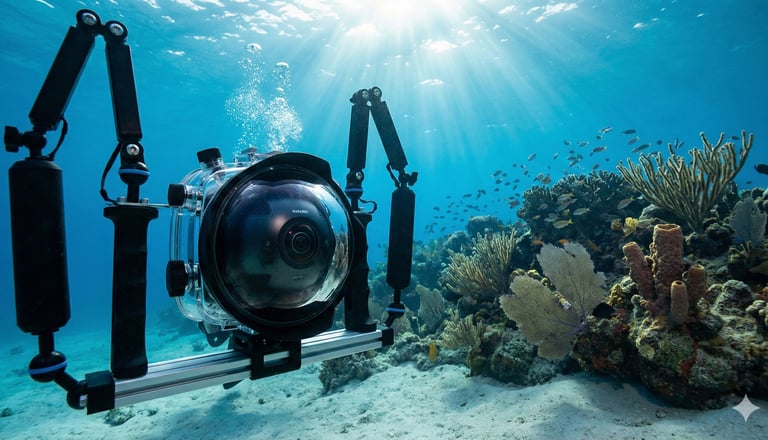
🎥 Equipment Required for Underwater 360 Shooting
1️⃣ Insta360 Pro 2 Camera
Shoots up to 8K 360° video
Professional-grade stitching
Excellent dynamic range
2️⃣ Dedicated Underwater Housing (Mandatory)
Rated minimum 30–60 meters
Optical dome ports for lenses
Access to power & control buttons
⚠️ Never attempt underwater shooting without certified housing.
3️⃣ Underwater Lighting (Very Important)
Water absorbs light quickly, especially red tones.
Recommended:
Dual underwater LED lights
5000–8000 lumens
Mounted symmetrically to reduce shadows
⚙️ Recommended Camera Settings (Insta360 Pro 2)
SettingValueResolution6K or 8KFrame Rate30 fpsColor ProfileFlat / LogWhite BalanceManual (5000–5600K)ISOAs low as possibleFlowStateOFFStitch ModeOptical Flow ON
👉 Always shoot in Flat/Log for better color correction underwater.
🌊 Underwater Shooting Techniques
✔ Keep Camera Stable
Use tripod or underwater rig
Avoid fast movement
✔ Maintain Distance
Keep subject 1.5–3 meters away
Avoid placing objects too close to lenses
✔ Slow Motion Only
Slow, cinematic camera movement
Avoid rapid rotations
✔ Control Bubbles
Avoid shooting near air bubbles
They create stitching errors
🎨 Color Correction (Post-Production Tip)
Underwater footage often looks:
Blue or green
Low contrast
Fix in Final Cut Pro X / DaVinci Resolve:
Increase reds & oranges
Adjust contrast & clarity
Reduce haze
🖥 Stitching Workflow (Best Practice)
1️⃣ Copy footage to internal SSD
2️⃣ Stitch clips one by one in Insta360 Stitcher
3️⃣ Export in ProRes 422
4️⃣ Edit & color grade in Final Cut Pro X
5️⃣ Deliver for:
VR Headsets (Meta, HTC Vive)
YouTube 360
Offline VR installations
🧠 Safety Tips (Very Important)
Test housing before every shoot
Clean O-rings properly
Avoid saltwater residue
Dry camera fully before opening housing
Never change battery near water
🎯 Use Cases for Underwater 360 Videos
Luxury resorts & pools
Scuba diving experiences
Religious water rituals
Adventure tourism
Marine documentaries
Virtual reality exhibitions
🎬 Recommended YouTube Reference
🔗 Search on YouTube:
“Insta360 Pro 2 Underwater Housing Test 360 Video”
This type of video clearly demonstrates:
Housing setup
Underwater behavior
Real-world stitching results
(Choose videos with full underwater demo, not short reels.)
💼 How This Relates to 360 VR Photography Services
At 360 VR Photography, we specialize in:
🎥 Professional 360° VR Videography
🌊 Underwater 360 VR Shoots
🏨 Resort & Tourism VR Experiences
🧠 Immersive VR Storytelling
🎮 VR Content for Headsets & Metaverse
🎨 Post-production, Stitching & Color Grading
We handle end-to-end production — from camera setup to final immersive delivery.
📞 Contact Us
🌐 Website: www.360vrphotography.in
📧 Email: info@360vrphotography.in
📱 Call / WhatsApp: 9920322366 , please give human touch to this blog , and insert. reference links and highlight , in to this blog which help reader , like wikipedia , reddit , and also add FAQ , and suggest one video from youtube and write my contact details and website
Underwater 360° videos create a magical, immersive experience that traditional cameras simply cannot match. From luxury resorts and adventure tourism to spiritual and marine documentaries, 360° underwater VR content is becoming a powerful storytelling tool.
The Insta360 Pro 2, when paired with proper underwater housing and shooting techniques, can deliver breathtaking immersive visuals beneath the water’s surface. In this guide, we explain step-by-step how professionals shoot underwater 360 videos safely and effectively.
🎥 Equipment Required for Underwater 360 Shooting
Insta360 Pro 2 Camera: Shoots up to 8K 360° video with professional-grade stitching and excellent dynamic range.
Dedicated Underwater Housing (Mandatory): Must be rated for a minimum of 30–60 meters with optical dome ports for lenses.
Warning: Never attempt underwater shooting without certified housing.
Underwater Lighting: Water absorbs light quickly, especially red tones.
Dual underwater LED lights (5000–8000 lumens).
Mounted symmetrically to reduce shadows.
👉 Pro Tip: Always shoot in Flat/Log for better color correction underwater.
🌊 Underwater Shooting Techniques
Keep Camera Stable: Use a tripod or underwater rig and avoid fast movement.
Maintain Distance: Keep your subject 1.5–3 meters away; objects too close to lenses cause stitching errors.
Slow Motion Only: Use slow, cinematic movements and avoid rapid rotations.
Control Bubbles: Avoid shooting near air bubbles, as they create major stitching artifacts.
🎨 Color Correction & Stitching Workflow
Underwater footage often looks blue or green and lacks contrast because water acts as a filter for red light.
Fixing in Post: Increase reds and oranges, adjust contrast, and reduce haze in Final Cut Pro X or DaVinci Resolve.
Stitching: Copy footage to an internal SSD and stitch clips one by one in Insta360 Stitcher using Optical Flow.
Export: Use ProRes 422 for the best quality before editing.
🗣️ Frequently Asked Questions (FAQ)
Q: Why does my footage look so blue?
A: As explained in the Wikipedia article on the Color of Water, water molecules absorb longer wavelengths (reds/oranges) much faster than shorter ones (blues). You must add these colors back in post-production.
Q: Can I use the Insta360 Pro 2 in saltwater?
A: Yes, but you must rinse the housing thoroughly with fresh water immediately after the dive to prevent salt crystallization on O-rings and dome ports.
Q: How do I hide the "seam" lines underwater?
A: According to discussions on Reddit r/Insta360, the "Optical Flow" stitching method is best for underwater work, but keeping your subject at least 2 meters away from the camera is the most effective way to minimize visible seams.
✨ Support Services from 360 VR Photography
At 360 VR Photography, led by Viral Gala, we specialize in:
🎥 Professional 360° VR Videography
🌊 Underwater 360 VR Shoots
🏨 Resort & Tourism VR Experiences
🧠 Immersive VR Storytelling
🎮 VR Content for Headsets & Metaverse
🎨 Post-production, Stitching & Color Grading
We handle end-to-end production—from camera setup to final immersive delivery.
Contact Viral Gala (360 VR Photography)
DetailInformationCompany Name360 VR PhotographyWebsitewww.360vrphotography.in and www.360vrphotography.comContact Number+91 99203 22366Emailinfo@360vrphotography.in

Experience
Engaging virtual tours for real estate and events.
Innovative
info@360vrphotography.in
+91 9920322366